> ## Documentation Index
> Fetch the complete documentation index at: https://docs.revoscripts.com/llms.txt
> Use this file to discover all available pages before exploring further.
# How to Update
> Learn how to update your Revo Scripts when a new version is released.
You will receive update access only if your purchase is valid and verified.
Keeping your Revo Scripts up-to-date ensures access to the latest features, improvements, and bug fixes.
Go to the CFX.re Keymaster Granted Assets and log in using the same CFX account used to purchase the script.
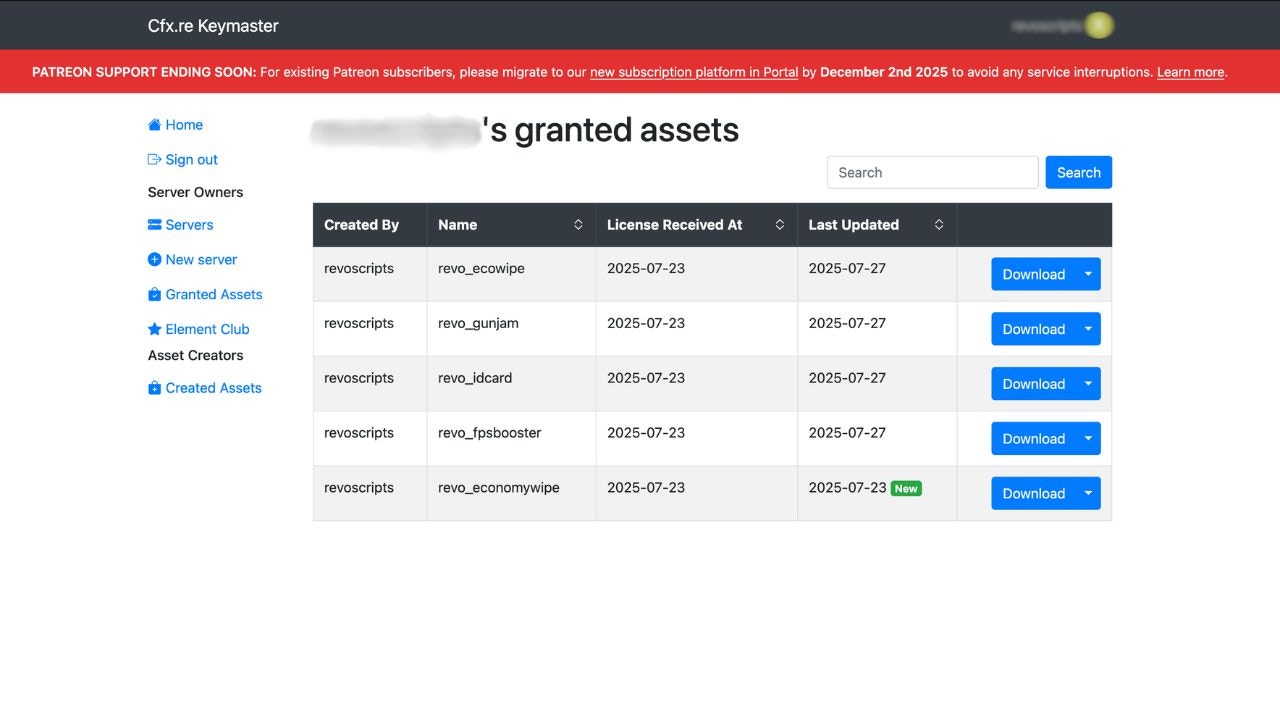 Locate the script you want to update in your granted assets and download the latest available bundle.
The latest version will always be available in your asset grant. There’s no need to repurchase.
1. Unzip the newly downloaded script bundle.
Locate the script you want to update in your granted assets and download the latest available bundle.
The latest version will always be available in your asset grant. There’s no need to repurchase.
1. Unzip the newly downloaded script bundle.
2. Open your server directory and navigate to the resources folder.
3. Delete the old version of the script folder.
4. Move the new script folder into the resources folder.
Always back up your previous script folder and configuration files before replacing them with the new version.
You can either restart your server or refresh the resource using:
```bash theme={null}
refresh
restart [script-name]
```
Make sure the folder name matches the one used in your server.cfg (or update the config accordingly).